

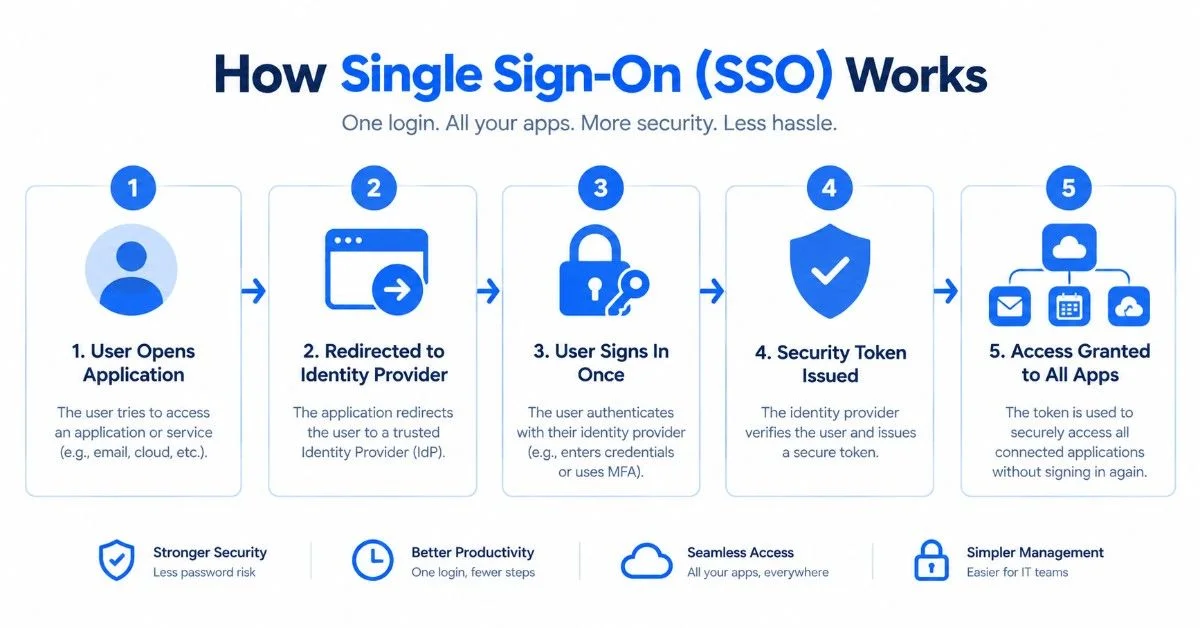
Single Sign-On (SSO) is a technology that lets users access multiple applications, websites, or services by signing in only once. Instead of remembering a different username and password for every application, users can authenticate through one central identity provider and then access other connected services.
Businesses, schools, organizations, cloud platforms, and websites commonly use SSO to manage access across multiple systems.
For example, an employee might use one company account to access email, project management software, cloud storage, HR systems, and other workplace applications. Once they sign in through the organization’s SSO system, they typically won’t need to enter their password again for every connected application.
So what exactly does SSO mean, how does it work, and is it secure? Let’s explore everything you need to know about Single Sign-On.
What Does SSO Stand For?
SSO stands for Single Sign-On — an authentication method that lets a user sign in once and access multiple connected applications without repeatedly entering separate login credentials.
The main idea behind SSO is simple: one login, multiple applications.
Instead of maintaining separate credentials for every service, the user authenticates through a trusted central system. Because it helps organizations control who can access applications and services, SSO is often associated with identity and access management (IAM).
What Is Single Sign-On?
Single Sign-On is an authentication service that connects multiple applications through a centralized identity provider, often called an IdP, which verifies the user’s identity.
When a user wants to open an application, the system checks whether the identity provider has already authenticated them. If so, the user may access the application without entering another password.
This process can make logins faster and easier, while also giving organizations a centralized way to manage user identities.
How Does Single Sign-On Work?
SSO works through communication between a user, an identity provider, and one or more applications — the application requesting access is commonly called the service provider (SP).
A simplified SSO process looks like this:
User → Application → Identity Provider → Authentication → Security Token → Application Access
Here’s how the process unfolds step by step.
1. The User Opens an Application
First, the user tries to access an application or website that supports SSO. The system then checks whether the user already has an authenticated session.
2. The Application Redirects the User
If not yet authenticated, the application sends the user to the identity provider, which is responsible for verifying their identity.
3. The User Signs In
Next, the user provides the required credentials. Depending on the organization’s security setup, this could involve a password, multifactor authentication, biometric verification, or another method.
4. The Identity Provider Verifies the User
The identity provider checks whether the credentials and authentication information are valid. If authentication succeeds, it creates an authentication result or token.
5. A Security Token Is Issued
The identity provider then sends information that lets the application verify successful authentication. Different SSO systems may use different standards and token formats for this.
6. The Application Validates the Authentication
Meanwhile, the service provider confirms that the authentication information came from a trusted identity provider and remains unmodified.
7. Access Is Granted
Once everything checks out, the application allows the user to access the requested service.
8. Other Connected Applications Can Use the Same Session
Finally, when the user opens another application within the same SSO environment, the system recognizes the existing session — so they can access the second application without re-entering credentials. This is the main convenience Single Sign-On offers.
What Are the Main SSO Protocols?
SSO systems rely on different protocols and standards to securely exchange authentication and identity information. Commonly used technologies include SAML, OAuth, OpenID Connect, and Kerberos.
SAML — Short for Security Assertion Markup Language, SAML handles the exchange of authentication and authorization information between an identity provider and a service provider. Enterprises widely associate it with business SSO environments.
OAuth — This authorization framework lets applications access certain resources without requiring the user to share their password directly. Web and mobile environments frequently rely on it. However, it’s worth noting that OAuth functions primarily as an authorization framework rather than a complete authentication protocol.
OpenID Connect (OIDC) — Built on top of OAuth 2.0, OIDC provides a standardized way for applications to verify a user’s identity and receive basic information about them. Modern web and mobile applications commonly use this protocol.
Kerberos — This network authentication protocol uses tickets to authenticate users and services. After initial authentication, users can obtain service tickets to access other authorized services without repeatedly entering credentials.
What Are the Different Types of SSO?
Organizations can implement Single Sign-On in several ways, depending on their requirements and the applications involved.
Social SSO lets users sign in to a website or application using an existing account from a consumer platform — for example, options like “Continue with Google,” “Continue with Apple,” or “Continue with LinkedIn.” Here, the external provider handles authentication.
Enterprise SSO suits organizations where employees need access to multiple internal and business applications. For instance, an employee might use one corporate identity to access email, HR software, collaboration tools, and cloud applications — simplifying account management for both users and IT teams.
Web-Based SSO allows authentication across multiple web applications through identity federation, using technologies such as SAML, OAuth, and OpenID Connect depending on the environment.
Cloud-Based SSO suits organizations that rely heavily on cloud applications. Rather than managing separate authentication systems for every service, businesses can connect applications to a central identity provider, making access management easier as they add more cloud tools.
Mobile SSO allows authentication across mobile applications through centralized identity services, and it can work alongside device-based security features such as biometrics.
Smart Card SSO uses a physical card containing credentials or certificates. Once authenticated with the card, users can access authorized services without repeated password entry — a method well-suited to environments requiring strong identity verification.
What Are the Benefits of Single Sign-On?
SSO offers several benefits for both users and organizations.
Easier Login Experience — The most obvious benefit is convenience. Users don’t have to remember a separate password for every application; instead, they rely on one central identity.
Fewer Passwords to Remember — Employees using many applications can quickly end up managing dozens of passwords. SSO reduces this burden, which can also lower password-related support requests.
Centralized Access Management — SSO gives organizations one place to manage authentication. When an employee joins, administrators create appropriate access; when someone leaves, they can disable the account and remove access from connected services just as easily.
Reduced IT Support Work — Since forgotten passwords and login issues generate a large share of IT tickets, simplifying authentication can reduce these problems and make account administration more efficient.
Improved Visibility — Centralized authentication makes it easier for organizations to monitor login activity. Security teams, for example, can use authentication logs to investigate unusual access attempts.
Easier Scalability — As a business grows and adds employees and applications, a centralized identity system makes managing access across a growing environment much simpler.
Is Single Sign-On Secure?
SSO can improve security, but adopting it doesn’t automatically make an organization secure. Centralizing authentication creates both benefits and risks — and the security of any SSO environment depends on how well the identity provider, authentication methods, permissions, sessions, and policies are configured.
Adding protections such as multifactor authentication (MFA) can provide another important security layer.
What Are the Risks of SSO?

Organizations need to weigh several security concerns before adopting SSO.
Single Point of Failure — Perhaps the biggest concern: a compromised central identity can potentially unlock multiple connected applications. If an attacker gains control of a user’s SSO account, they may access every service available to that user — making protection of the central identity critical.
Phishing Attacks — Because attackers often target SSO credentials through phishing campaigns, a successful attack against a central account can have a far wider impact than compromising credentials for just one application. Strong authentication policies, MFA, user education, and phishing-resistant methods can help reduce this risk.
Token Theft — SSO systems use authentication tokens to maintain sessions. If a token is stolen or improperly exposed, an attacker could potentially impersonate an authenticated user. Secure token handling, encryption, and endpoint security help mitigate this.
Incorrect Configuration — Misconfigurations can create vulnerabilities, including incorrect permissions, weak token settings, improper certificate validation, or excessive user privileges. Regular security reviews help catch these problems early.
Vendor Dependency — Organizations relying heavily on an external identity provider become dependent on that provider’s availability and security. A serious outage or breach could therefore affect many connected applications at once.
Compliance Issues — Since some organizations operate under strict data protection requirements, SSO implementations must align with relevant regulatory obligations.
How to Implement Single Sign-On
Implementing SSO involves more than simply connecting an application to a login provider. Organizations should first determine which applications need SSO and which authentication standards they support.
Step 1: Identify Your Requirements — Determine which applications need SSO, who needs access, what security level is required, which protocols are supported, and what compliance requirements apply.
Step 2: Choose an Identity Provider — Select a trusted provider that supports your applications, security requirements, and integration standards.
Step 3: Select the Appropriate Protocol — Different applications may require different standards; for example, an organization might use SAML for enterprise applications and OpenID Connect for modern web apps.
Step 4: Connect Applications — Each service provider needs to establish a trusted relationship with the identity provider so it can recognize and validate authentication information.
Step 5: Add Strong Security Controls — Consider multifactor authentication, role-based access control, least-privilege permissions, session timeouts, and authentication monitoring.
Step 6: Test the System — Before a full launch, test the authentication process across different applications and user roles to catch configuration problems early.
Step 7: Monitor and Maintain — Finally, continuously review permissions, authentication logs, integrations, and security settings to keep the system secure over time.
Advantages and Disadvantages of SSO
Advantages:
- One login for multiple applications
- Fewer passwords to remember
- Easier user experience
- Centralized identity management
- Reduced password-related IT support
- Better visibility into authentication
- Easier employee onboarding and offboarding
- Supports organizational growth
Disadvantages:
- Central identity can become a major security target
- Implementation can be technically complex
- Initial costs can be significant
- Incorrect configuration can create security gaps
- Users may lose access to multiple applications if the identity provider goes down
- Organizations can become dependent on a particular SSO provider
Ultimately, the actual benefits and limitations depend on how an organization designs and manages its SSO system.
SSO vs Traditional Login
With traditional authentication, every application may run its own login system. An employee, for instance, could juggle separate credentials for email, CRM, HR, cloud storage, and project management tools.
With SSO, these applications connect to a central identity provider instead — simplifying the experience into one central login granting access to multiple authorized applications.
That said, this doesn’t mean every application uses identical underlying technology; different applications can use different protocols while still connecting to the same identity infrastructure.
What Is the Difference Between SSO and MFA?
SSO and MFA both relate to authentication, but they solve different problems. SSO focuses on reducing repeated logins across applications, while MFA adds additional verification during sign-in — for example, confirming identity with a security key or authentication app after entering a password.
In fact, organizations often use SSO and MFA together, since combining centralized authentication with strong additional verification helps protect the central identity that controls access to multiple applications.
Examples of SSO Providers
Several technology companies offer identity and access management products with SSO functionality, including:
- Okta
- Microsoft identity services
- OneLogin
- Ping Identity
- Auth0
- Rippling
The right provider depends on factors like application compatibility, organization size, security requirements, integration needs, and budget.
Why Do Businesses Use SSO?
Businesses rely on many applications every day — communication platforms, cloud storage, CRM software, accounting systems, HR tools, and internal systems, to name a few. Managing separate credentials for each one can quickly become unwieldy.
SSO offers a centralized approach that simplifies the user experience while giving IT teams greater control over access. For larger organizations especially, this becomes particularly valuable during employee onboarding and offboarding.
Is SSO Good for Small Businesses?
Small businesses can benefit from SSO too, especially when employees use several cloud applications. That said, cost, complexity, the number of applications, security requirements, and administrative needs are all worth considering before implementation.
A small company with only a few applications will naturally have different requirements than a large enterprise managing thousands of employees and hundreds of services — so the right approach really depends on each organization’s specific environment.
Conclusion
Single Sign-On (SSO) is an authentication technology that lets users access multiple connected applications after signing in through a central identity provider. Instead of remembering different passwords for every service, users authenticate once and then access authorized applications during the same session.
SSO can improve convenience, simplify identity management, reduce password-related IT work, and provide centralized visibility into authentication. However, centralizing authentication also creates important security responsibilities — a compromised account, stolen token, misconfiguration, or identity-provider outage can potentially affect multiple applications at once.
For this reason, organizations should pair SSO with strong security practices such as MFA, least-privilege access, monitoring, and regular access reviews. When properly designed and managed, SSO can become a valuable part of an organization’s identity and access management strategy.
FAQs About Single Sign-On (SSO)
What does SSO stand for?
SSO stands for Single Sign-On. It lets users access multiple connected applications after authenticating through a central identity system.
What is SSO in simple words?
SSO means logging in once and then accessing multiple authorized applications without re-entering your username and password for every service.
How does SSO work?
Typically, an identity provider authenticates the user and provides information that connected applications can validate.
Is SSO secure?
SSO can improve security and simplify access management, but it also creates risks if the central account, tokens, or identity provider are compromised. MFA and strong security controls help reduce these risks.
What is an identity provider?
An identity provider, or IdP, verifies a user’s identity and manages authentication for connected applications.
What is a service provider in SSO?
A service provider, or SP, is the application or service the user wants to access — it relies on the identity provider for authentication.
What are common SSO protocols?
Common technologies include SAML, OAuth, OpenID Connect, and Kerberos.
What is the difference between SSO and MFA?
SSO reduces repeated logins across applications, while MFA adds additional verification to confirm a user’s identity.
Can SSO be used for cloud applications?
Yes — cloud-based SSO commonly provides centralized authentication across multiple cloud applications.
Why do companies use SSO?
Companies use SSO to simplify user access, centralize identity management, reduce password-related support work, and manage access across multiple applications more efficiently.